
Download Forecast Bar – Free Weather Radar & Alerts for Mac
Overview
Forecast Bar – Weather, Radar And Alerts is a free, lightweight app designed exclusively for macOS users who want real‑time weather information without leaving their desktop. Developed by Real Casual Games, LLC, this utility sits neatly in your menu bar, delivering up‑to‑the‑minute forecasts, animated radar maps, and severe‑weather alerts at a glance. The current version, 5.0.2, brings a refreshed UI, smoother animations, and more accurate data sources while keeping the interface uncluttered and intuitive.
Because it runs in the menu bar, you never have to switch between windows or open a browser to check the weather; the app silently updates in the background, ensuring you’re always prepared for rain, snow, or sunshine. While the program is only available in English, its simplicity makes it an ideal companion for anyone who values a quick, reliable weather snapshot while working, studying, or traveling. The software is listed under the “Weather” category on Softonic, where it was first published on March 31st 2017.
Although Softonic has not performed a formal review, user feedback highlights the app’s speed, accuracy, and the convenience of having radar imagery directly on the Mac menu bar. Whether you’re a commuter needing hourly updates, a hiker planning a weekend trek, or a remote worker monitoring outdoor conditions for a home office, Forecast Bar provides a free, secure solution that integrates seamlessly with macOS’s design language. Its low‑impact footprint means it won’t drain battery life or consume excessive resources, making it a sensible addition for Mac users who appreciate both form and function in their daily tools.
Key Features & System Compatibility
Feature List
- Live weather updates displayed in the menu bar.
- Animated radar maps with zoom and pan controls.
- Severe weather alerts (storm, tornado, flood warnings).
- Hourly, daily, and 7‑day forecasts.
- Customizable temperature units (Celsius/Fahrenheit).
- Multiple location support – add up to five favorite cities.
- Low‑resource consumption – runs efficiently on older Macs.
- Automatic updates ensuring the latest data and security patches.
- Dark mode support to match macOS appearance settings.
- Simple, drag‑and‑drop interface for adding locations.
Compatibility
Forecast Bar is built specifically for macOS and supports versions from macOS 10.12 Sierra onward. The app takes advantage of native macOS frameworks, ensuring smooth animation and reliable background updates. Because it is a native Mac application, it runs natively on both Intel‑based Macs and Apple Silicon (M1, M2, and later) without the need for Rosetta translation.
Users with older hardware will still enjoy the app’s lightweight design, as it consumes minimal CPU and memory resources, preserving battery life on laptops. While the software is currently offered only in English, the UI follows macOS localization standards, making it ready for future language expansions. The developer has prioritized security by signing the application with an Apple Developer ID, meaning macOS Gatekeeper will allow a seamless installation without warning dialogs, provided the user opts to download from the official site or trusted sources like Softonic.
Overall, the compatibility scope ensures that anyone with a reasonably recent Mac can download, install, and start using Forecast Bar without compatibility concerns.
Installation & Daily Usage Guide
Getting Forecast Bar up and running is straightforward, even for users who are new to installing third‑party utilities on macOS. Follow these steps to ensure a smooth setup:
- Download the installer: Visit the official download page or a reputable source such as Softonic. Click the “Download Forecast Bar” button, which will retrieve a .dmg file named
ForecastBar_5.0.2.dmg. - Open the DMG: Double‑click the downloaded file. macOS will mount a virtual disk and open a window displaying the app icon and a shortcut to the Applications folder.
- Install the app: Drag the Forecast Bar icon onto the Applications shortcut. This copies the app to your
/Applicationsdirectory. - Launch the program: Navigate to the Applications folder and double‑click Forecast Bar. The first launch may trigger a Gatekeeper prompt; click “Open” to confirm you trust the developer.
- Initial configuration: Upon opening, the app will request permission to access your location. Granting this permission enables automatic weather updates for your current city. You can also manually add locations by clicking the “+” button in the menu bar dropdown.
- Customize preferences: Access the Settings window via the menu bar icon → “Preferences.” Here you can switch temperature units, enable/disable radar animation, set the refresh interval, and choose whether to receive push notifications for severe weather alerts.
- Set to start at login: In the Preferences pane, enable “Launch at login” to have Forecast Bar automatically appear each time you start your Mac, ensuring you never miss an alert.
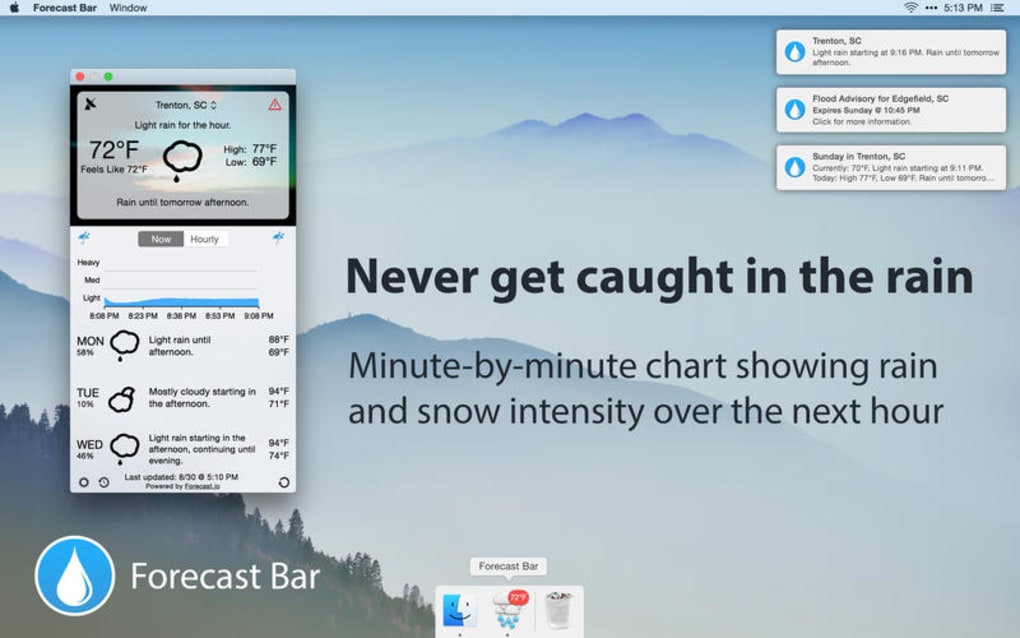
Once installed, using Forecast Bar becomes a habit. The menu bar icon displays a concise weather summary—temperature, condition icon, and precipitation chance. Clicking the icon expands a detailed view with a radar map, hourly forecast, and a list of any active alerts.
The radar can be toggled between satellite view and precipitation mode, giving you a visual sense of incoming storms. For quick reference, hover over the temperature to see a tooltip with the high/low for the day. The app updates automatically every 15 minutes, but you can force a refresh by selecting “Refresh Now” from the dropdown.
All settings are saved locally, so your preferences persist across restarts and system updates. The intuitive design means you spend less time navigating menus and more time focusing on the tasks at hand, with the confidence that you’re always informed about the weather outside.
Pros, Cons & Frequently Asked Questions
Pros
- Free and fully functional without hidden fees.
- Runs natively on both Intel and Apple Silicon Macs.
- Lightweight design keeps CPU and memory usage low.
- Real‑time radar and severe‑weather alerts keep you prepared.
- Dark mode integration matches macOS system appearance.
- Customizable locations and temperature units.
- Automatic updates ensure the latest data and security patches.
Cons
- Only available in English; no multilingual support yet.
- Lacks advanced customization such as custom skins or themes.
- No integration with third‑party calendar or task apps.
- Limited to macOS – no Windows, Android, or iOS versions.
- Radar imagery resolution is adequate but not as detailed as premium services.
FAQ
Is Forecast Bar completely free or does it contain in‑app purchases?
Forecast Bar is a completely free application. All core features, including radar, alerts, and multiple locations, are available without any in‑app purchases or subscription fees.
How often does the weather data refresh?
By default, Forecast Bar refreshes its data every 15 minutes. Users can adjust the refresh interval in the Preferences pane, choosing between 5, 15, 30, or 60‑minute intervals.
Can I use Forecast Bar on an older Mac running macOS 10.12?
Yes. The app supports macOS 10.12 Sierra and later, making it compatible with most Macs released in the past decade.
Does Forecast Bar provide severe‑weather notifications?
Absolutely. When a severe‑weather alert (such as tornado, flood, or extreme wind) is issued for any of your saved locations, the app displays a banner notification and highlights the alert in the dropdown menu.
Is the radar data sourced from a reliable provider?
Forecast Bar pulls radar imagery from reputable public meteorological services, ensuring accurate and up‑to‑date visualizations. The data is refreshed in line with the provider’s update schedule.
Conclusion & Call to Action
Forecast Bar delivers a compelling blend of simplicity, reliability, and visual appeal for macOS users seeking a free weather companion. Its unobtrusive menu‑bar presence means you stay informed without sacrificing screen real estate, while the inclusion of live radar and instant alerts adds a layer of safety for those living in regions prone to sudden weather changes. Although the app currently lacks multilingual support and deeper integrations, its core functionality is robust enough to satisfy daily commuters, outdoor enthusiasts, and remote workers alike. The low resource footprint and seamless macOS integration make it an ideal addition to any Mac workflow, especially for users who value a clean, distraction‑free interface. If you’re ready to enhance your weather monitoring experience without spending a dime, click the download button below, install Forecast Bar, and enjoy real‑time forecasts at a glance.







